
Can You Integrate Inexpensive Security Systems With Smartphones? (2026 Ultimate Guide)
In an age where connectivity, convenience, and cost-effectiveness are more important than ever, integrating affordable security systems with a smartphone isn’t just possible — it’s now commonplace. From budget-friendly DIY setups to advanced IoT-enabled alarms, today’s tech empowers homeowners, renters, and small business owners to keep their properties safe without breaking the bank.
This comprehensive blog explores the feasibility, technology, benefits, challenges, real-world solutions, and step-by-step tips for integrating inexpensive security systems with smartphones — an SEO-optimized guide designed for clarity, depth, and actionable insight.
What Does “Smartphone-Integrated Security” Really Mean?
Security systems traditionally relied on physical alarms, control panels, and monitoring stations — often tied to professional services and high monthly fees. Nowadays, smartphone integration refers to the ability to monitor, manage, and control your security system directly from your phone via apps and connected devices.
With integration, your smartphone can:
- Receive push notifications for security events
- Show real-time or recorded video footage
- Arm or disarm sensors
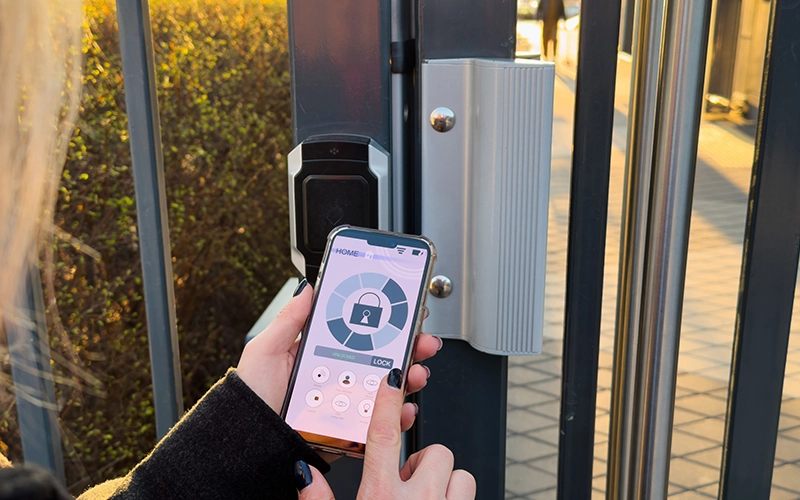
- Lock or unlock doors remotely
- Trigger alarms or automated responses
This means your device becomes both the brain and the interface for your entire home or workspace security setup.
How Modern Security Systems Communicate With Phones
Connectivity is the foundation of smartphone integration. Inexpensive systems typically rely on one or more of the following:
Wi-Fi Connectivity
Many affordable cameras, sensors, and alarms connect directly to a home Wi-Fi network, making them immediately reachable by your phone through an app.
Bluetooth and Bluetooth Low Energy
Low-power Bluetooth links can pair sensors or locks with your smartphone nearby. These setups are especially popular for locks and proximity-based arming/disarming.
IoT Protocols: Z-Wave, Zigbee, Matter
Established home automation standards like Z-Wave enable robust device communication across sensors, hubs, and smartphones. Z-Wave, for example, forms a mesh network where devices relay signals to improve range and stability — all controllable via smartphone apps.
Mobile Apps and Cloud Platforms
Security system manufacturers provide smartphone apps that serve as the interface for alerts, camera feeds, sensor status, and automation rules. Most apps are compatible with both iOS and Android.
Read about our additional security technologies.
Affordable Security Systems That Work With Smartphones (2026)
Contrary to what some may assume, smartphone integration isn’t exclusive to high-end systems. Many inexpensive and mid-range systems now offer robust app support:
SimpliSafe
SimpliSafe remains a budget-friendly favorite, offering cameras, door/window sensors, motion detectors, and app-driven monitoring via iOS and Android.
Abode
Abode’s DIY system lets users customize kits with sensors and cameras, all managed through a smartphone app.
Wyze
Wyze offers ultra-affordable cameras and sensor kits that integrate with their mobile app and third-party platforms.
Xiaomi & Smart Life Ecosystem
Brands like Xiaomi and devices using the Smart Life app allow inexpensive cameras and motion sensors to connect directly to your smartphone for remote control.
PGST and Smart Life Combo Systems
Affordable kits incorporating sensors, alarms, and smartphone control via the Smart Life app are growing in popularity — often with no monthly fees.
DIY Integration: Turn Your Phone Into Part of the Security System
If you’re truly on a budget, DIY integration can also be a powerful option:
Turn Old Phones into Security Cameras
Apps like Alfred and WardenCam transform spare smartphones into live security cameras that stream to your current phone — essentially free or very low cost.
Raspberry Pi and IoT Platforms
Open-source IoT platforms using devices like Raspberry Pi paired with motion sensors and a smartphone app show how self-built systems can be both cheap and effective.
Blynk and IoT Integration
Low-cost sensors plugged into microcontrollers (e.g., ESP8266) can send notifications and alerts to a smartphone app like Blynk — making a DIY theft detection system functional with your phone.
Key Technologies Enabling Smartphone Integration
Understanding the technologies behind integration helps identify the best setup for your budget.
Near-Field Communication (NFC)
NFC allows secure short-range communication for keyless entry and smartphone authentication.
Wireless Network Protocols
Wi-Fi and Bluetooth are fundamental, letting devices report status and alerts over your home network, reachable by your phone.
IoT Standards (Z-Wave, Zigbee, Matter)
These protocols enable sensor networks to communicate efficiently with smartphones through hubs or bridges.
Cloud Services
Cloud platforms connect devices and smartphone apps even when you’re away from home, offering remote access and storage.
Advantages of Smartphone-Connected Security
Integrating your security system with your smartphone brings tangible benefits:
Remote Monitoring and Real-Time Alerts
Whether you’re at work or on vacation, your phone can notify you of motion, alarms, or suspicious activity instantly.
Lower Costs
Mobile management often eliminates the need for expensive control panels or professional monitoring services, significantly reducing long-term costs.
Convenience and Control
Smartphone apps allow you to arm/disarm systems, view live footage, adjust settings, or even lock doors from anywhere.
Automation and Geofencing
Advanced apps use geofencing to arm or disarm systems automatically based on phone location, adding convenience and security.
Reduced Hardware Requirements
Because the smartphone serves as a central interface, you can often buy fewer dedicated devices and still maintain full control.
Security Risks and How to Mitigate Them
While integration offers convenience and value, there are some security concerns to address:
Network Vulnerabilities
Connected devices are only as secure as your network. Use a separate network for IoT devices, strong WPA3 encryption, and regularly update firmware.
App Security
Always choose reputable apps with features like two-factor authentication (2FA) and regular security patches.
Unauthorized Access
Ensure that account credentials are strong and unique. Avoid sharing login information indiscriminately.
Cloud vs. Local Storage
Be aware of where video footage and logs are stored. Local storage reduces cloud exposure but may limit remote access.
Step-by-Step: Integrating Your System With Your Phone
Here’s a simple roadmap to get started:
Step 1: Choose Your Devices
Pick cameras, sensors, and alarms that explicitly mention smartphone app support (iOS and Android).
Step 2: Set Up Your Network
Ensure your Wi-Fi network is stable and secure. Consider a dedicated Wi-Fi SSID for security devices.
Step 3: Download the App
Install the manufacturer’s security app (e.g., SimpliSafe, Wyze, Smart Life).
Step 4: Pair Devices
Follow in-app instructions to add cameras, sensors, and locks. Most systems use QR codes or BLE scanning.
Step 5: Configure Alerts
Enable push notifications so your phone receives real-time event alerts.
Step 6: Test and Automate
Test motion detection, arming/disarming, and automation rules like geofencing.
Step 7: Monitor and Update
Regularly check for firmware and app updates to maintain security and performance.
Future Trends: What’s Next for Mobile Security Integration
Looking ahead, several trends will shape the future of inexpensive smartphone-integrated security:
Matter and Cross-Platform Compatibility
Matter is emerging as a universal smart home standard that promises easier integration across brands and devices.
AI and Smart Detection
AI will drive more accurate motion and event detection, minimizing false alarms while enhancing threat recognition.
Edge Processing
More processing will happen locally on devices, improving speed and privacy.
Voice and Wearable Integration
Smart assistants and wearables may become seamless extensions of security systems.
Conclusion
So, can you integrate inexpensive security systems with smartphones? The short answer is yes, and it’s easier and more affordable than ever before. With the rise of Wi-Fi-enabled cameras, IoT-ready sensors, versatile smartphone apps, and DIY options, smartphone-based security is no longer a luxury; it’s an accessible reality for budget-conscious users.
Whether you choose plug-and-play cameras, affordable sensor kits, or repurpose old phones as surveillance devices, the technology exists to empower you with remote monitoring, instant alerts, automation, and real-time control from the palm of your hand. The key is to pick devices that fit your needs, secure your network, and stay up to date with best practices.