
Understanding the Purpose of Access Control
Picture this: it’s a Tuesday morning and you walk into your office to find that an ex-employee — someone who left the company three months ago — has been silently accessing your server room after hours. No forced entry. No broken windows. Just an old keycard that nobody deactivated.
This isn’t a hypothetical. It’s one of the most common physical security failures that businesses of all sizes face, and it’s entirely preventable.
If you’re running a business, managing a commercial property, or responsible for keeping people and assets safe, understanding the purpose of access control isn’t optional — it’s foundational. Access control is the layer of protection that stands between your most critical resources and everyone who shouldn’t have access to them.
In this guide, you’ll learn why access control is important for businesses, why it matters for both physical and digital security, the different types of systems available to businesses today, the most common mistakes organizations make, and how to think about implementing a system that grows with your operation.
What Is Access Control?
Access control is a security mechanism that determines who is allowed to enter a space, use a system, or interact with sensitive information — and just as importantly, who is not. At its core, it is the practice of granting or denying access based on verified identity, assigned permissions, or predefined security policies.
In physical security, access control governs entry points — doors, gates, server rooms, parking facilities, and restricted zones. In cybersecurity, it governs who can log into systems, read files, or execute sensitive commands.
Access controls restrict access to systems, resources, and data to authorized users, ensuring users have the appropriate level of access to perform their duties while preventing unauthorized access to sensitive information. The two core dimensions of access control are:
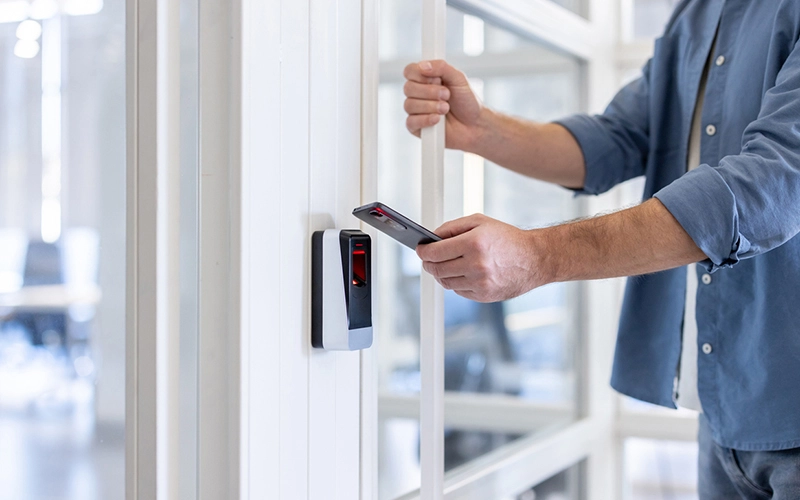
Physical access control — managing who can enter or exit a building, floor, or room using technologies like keycards, PIN pads, biometric readers, and video-integrated entry systems.
Logical access control — managing who can access digital assets, including networks, software platforms, databases, and cloud environments, through credentials, authentication protocols, and role-based permissions.
Modern businesses need both layers working in sync. A server room with a locked door but no network access control is half-protected. A cloud platform with multi-factor authentication but an open server room is equally vulnerable.
Why the Purpose of Access Control Goes Far Beyond Locking Doors
Many business owners think of access control as simply “who has a key.” That framing undersells the system’s true function by about a mile.
The purpose of access control in a business environment encompasses at least five distinct goals: protecting physical assets, preventing unauthorized data access, maintaining regulatory compliance, building an auditable trail of who did what and when, and enabling operational efficiency by giving the right people access to exactly what they need — nothing more, nothing less.
According to IBM’s X-Force Threat Intelligence Index, identity-based attacks — in which threat actors hijack valid user accounts to abuse their access privileges — account for almost a third of all breaches. That figure alone should reframe how your business thinks about access management.
“Access control is not a security feature. It is the security infrastructure that every other feature depends on.”
The Key Types of Access Control Systems Explained
Understanding the purpose of access control means understanding that not all systems are built the same. The right model depends on the size, complexity, and risk profile of your business.
Discretionary Access Control (DAC)
In a DAC system, the owner of a resource — a file, a door, a folder — decides who else can access it. Discretionary Access Control allows data owners to decide who can access their files and what actions they can perform. This model is flexible and responsive to everyday business needs, but it introduces risk: if a user with admin privileges makes a careless sharing decision, sensitive data can be exposed without any central oversight catching it.
DAC works well for small teams where resource owners are accountable and access needs shift frequently. It breaks down in larger organizations where visibility gaps create exploitable permission overlap.
Mandatory Access Control (MAC)
Mandatory Access Control is the strictest model, where the system sets all access rules using security labels and clearance, and users cannot change them, keeping everything tightly controlled. MAC is the model used in government facilities, defense contractors, and any environment where data classification is non-negotiable.
For most commercial businesses, MAC is too rigid for daily operations, but elements of it — such as tiered clearance levels for sensitive departments — can be incorporated into hybrid security frameworks.
Role-Based Access Control (RBAC)
RBAC is the most widely adopted access control model for businesses. Rather than assigning permissions to individual users, it assigns them to roles — and then assigns users to roles based on their job function. A warehouse manager gets warehouse-level access. A financial analyst gets finance system access. Neither gets the other’s permissions by default.
With RBAC, users only have access to the resources their roles justify, greatly limiting potential threat vectors. It also offers centralized, non-discretionary policies that allow security professionals to set consistent access rules across the organization. RBAC is scalable, audit-friendly, and aligns naturally with how most businesses already think about organizational hierarchy. For multi-site commercial properties, it’s often the foundation of a well-designed access control policy.
Attribute-Based Access Control (ABAC)
ABAC represents the modern evolution of access management. Rather than relying solely on role, it evaluates access based on a combination of attributes — user department, time of day, location, device type, and security clearance level — against a dynamic policy. A nurse might be permitted to access patient records between 7am and 7pm but not outside those hours. A contractor might be granted building access only during their contracted period.
ABAC is increasingly common in cloud-based environments and IoT-integrated facilities, and it powers many of the intelligent access decisions in today’s smart building ecosystems.
The Role of Access Control in Cybersecurity and Physical Security
One of the most important shifts in modern security thinking is the convergence of physical and cyber access control into a unified security posture. The two disciplines used to be managed in complete isolation — IT handled logins, facilities handled keycards. That siloed approach is now considered a vulnerability in itself.
Businesses are starting to view open, interoperable platforms as the new standard for access control and video security, with this trend expanding to include visitor management, building management, and analytics tools. When your physical access control system integrates with your surveillance cameras, visitor management platform, and identity management software, you gain something far more powerful than individual security tools: situational awareness. You can see who badged into a building, cross-reference that with camera footage, and flag anomalies — all from a single management console.
This integration is particularly critical for businesses managing multiple sites, high-traffic commercial properties, healthcare facilities, educational campuses, or any environment where personnel movement is complex and consequence-laden.
The role of access control in cybersecurity is equally significant. Broken access controls are ranked number one on the OWASP Top 10 list of the most critical web application security risks. Every application, cloud dashboard, and network-connected device your business uses is a potential entry point if access policies aren’t strictly enforced.
Access Control for Data Protection and User Authentication
Access control and data protection are inseparable in modern business. Regulations like HIPAA, GDPR, SOC 2, and PCI-DSS don’t just recommend access controls — they mandate them. Failing to restrict who can view, edit, or export sensitive data doesn’t just create security exposure; it creates legal liability.
According to the IBM Institute for Business Value’s 2025 CDO Study, 78% of CDOs say that leveraging proprietary data is a strategic business objective, and 82% believe data is going to waste if employees can’t readily use it to make data-driven decisions. Access control is the mechanism that makes both goals achievable simultaneously — secure enough to protect, open enough to empower.
User authentication sits at the front door of every access control framework. It’s the process of verifying that a person is who they claim to be before granting access. Modern authentication methods include:
Single-factor authentication — a password or PIN (increasingly considered insufficient on its own for sensitive systems).
Multi-factor authentication (MFA) — combining a password with a one-time code, biometric scan, or hardware token. MFA dramatically reduces the risk of credential-based breaches.
Biometric authentication — fingerprint scanning, facial recognition, iris scanning. Combining biometrics with other authentication methods, such as PINs and mobile credentials, adds an extra layer of security, reducing the risk of unauthorized access. MICT reported a 10x increase in mobile credential adoption rates over a two-year period, and an earlier survey found that 80% of American universities were already using or planning to implement them.
Access Control System Benefits and Functions Most Businesses Overlook
Beyond preventing unauthorized entry, a well-implemented access control system delivers operational and business value that most organizations don’t fully account for when evaluating the investment.
Real-Time Audit Trails
Every access event — entry, exit, denied attempt, after-hours access — is logged with a timestamp and user identity. This data is invaluable for incident investigation, compliance reporting, and pattern analysis. When something goes wrong, you don’t have to guess who was where. You know.
Automated Provisioning and De-Provisioning
When a new employee joins, their access credentials can be activated instantly with the permissions appropriate to their role. When they leave, those credentials can be deactivated immediately — eliminating the “forgotten keycard” vulnerability that affects a staggering number of businesses.
Visitor and Contractor Management
Access control systems enable businesses to issue temporary, time-limited credentials to vendors, contractors, and visitors. These credentials automatically expire, eliminating the need to track physical keys or badges after a visit concludes.
Remote Management Capability
Remote security’s primary benefit is that it allows organizations to maintain flexibility in their approach, regardless of where their teams are located. User permissions and door schedules can be adjusted at any time, with those changes taking effect instantly. This is particularly valuable for multi-site businesses and property managers overseeing several locations.
Liability Reduction
If an incident occurs on your property, an access control audit log can demonstrate that appropriate security measures were in place, who was authorized to be in a given area, and whether the security policy was followed. This documentation has real legal and insurance implications.
Common Mistakes Businesses Make With Access Control
Even well-invested security programs fail through predictable, repeatable errors:
Failing to deactivate credentials after offboarding.
The most common physical security failure in commercial environments. Without a structured protocol tying credential deactivation directly to HR termination, former employees retain access indefinitely.
Over-privileging users.
Granting broader access than a role requires creates unnecessary exposure. According to the 2025 Verizon DBIR, 6% of breaches involved privilege misuse. The principle of least privilege exists precisely to counter this tendency—and the human element still played a role in 60% of breaches, making unchecked access rights a persistent liability.
Treating access control as a one-time setup.
Roles evolve, staff change positions, and facilities expand. Without regular review — at minimum quarterly — systems accumulate permission drift and outdated credentials.
Siloing physical and digital access.
Managing building access separately from network access creates blind spots. Anomalies in one system rarely trigger alerts in the other, leaving unusual patterns undetected.
Neglecting visitor and contractor access.
Informal temporary credentials — paper sign-ins, shared door codes — leave no auditable record and often no expiry. The financial stakes are significant: in 2024 alone, more than $6.3 billion was transferred as part of Business Email Compromise scams, according to FBI IC3 data cited in the 2025 DBIR — losses frequently enabled by inadequate access controls. A digital visitor management system with time-bound, auditable credentials closes one of the most overlooked gaps in physical security.
What Does Access Control Cost?
Costs scale with facility size, complexity, and number of entry points. Small offices (1–3 access points) can start with modest card-reader or keypad systems; cloud-based platforms often run on a per-door, per-month model. Larger facilities—healthcare campuses, multi-tenant buildings, and industrial sites—see costs rise with credential hierarchy complexity, system integrations (video, visitor management, and intrusion detection), and whether the build is a retrofit or new.
The broader market signal is clear: the global access control market is projected to grow from USD 10.62 billion in 2025 to USD 15.80 billion by 2030, at a CAGR of 8.3%, driven by rising adoption of IoT-enabled security systems and cloud-based platforms.
The cost of not investing is measurable. Note: the original text cited $6.3 billion in BEC losses—that figure doesn’t match the primary source. According to the FBI’s 2024 IC3 Annual Report, BEC losses in 2024 totaled $2.77 billion across 21,442 reported incidents — still the second-highest cybercrime loss category. A single breach, unauthorized intrusion, or compliance violation can far exceed the cost of a properly installed system.
When budgeting, factor in hardware (readers, controllers, and locks), software licensing, installation, ongoing maintenance, and training. Work with a certified security integrator to match the solution to your facility’s risk profile.
Questions People Ask About Access Control (And Straight Answers)
What does access control actually do for a small business?
For a small business, access control removes physical keys from the equation; lets you instantly grant or revoke access to any team member; creates a log of who enters your facility and when; and protects sensitive areas like server rooms, storage, or back offices from unauthorized entry—all manageable from a smartphone or web dashboard.
Can access control systems work without internet?
Yes. Many access control systems store credentials and door schedules locally on hardware controllers, meaning the doors continue to function during an internet outage. Cloud-based management features — like remote changes or real-time alerts — typically require connectivity, but core access functions operate independently.
What’s the difference between access control and a regular lock?
A traditional lock uses a physical key that can be copied, lost, or forgotten. An access control system uses credentials that are unique, traceable, instantly revocable, and logged. It also allows time-based permissions, visitor management, and integration with surveillance and alarm systems — capabilities that no physical lock can match.
How does access control help with HIPAA or data compliance?
Access control is a mandated requirement under most major compliance frameworks. It provides the documented, auditable evidence that sensitive areas and data are restricted to authorized personnel — which is exactly what auditors and regulators look for. Without it, compliance becomes a paperwork exercise without corresponding technical controls.
Does my business need both physical and digital access control?
In virtually all cases, yes. Physical access controls protect your premises and hardware. Digital access controls protect your systems and data. They need to be consistent — the same employee shouldn’t have network admin privileges but no access to the server room, or vice versa. Integration between the two is increasingly considered best practice.
Frequently Asked Questions
What is the main purpose of access control in a business?
The primary purpose of access control is to ensure that only authorized individuals can enter specific areas of a facility or access particular systems and data. It protects assets, ensures regulatory compliance, creates auditable records, and reduces both internal and external security risks.
What are the most common types of access control systems?
The most common types are keycards and fobs, PIN-based keypads, biometric readers (fingerprint and facial recognition), mobile credential systems, and cloud-based access platforms. Many modern systems combine multiple credential types for layered security.
What is the importance of access control in security systems for employee safety?
Access control prevents unauthorized individuals from entering your workplace, reduces the risk of theft or violence, and ensures that employees in sensitive roles are protected from unauthorized access to their work areas. In emergency situations, access logs also help account for personnel.
Can access control systems be hacked?
Like any technology, access control systems have vulnerabilities if poorly configured or not updated. Outdated firmware, weak network segmentation, and shared credentials are the most common attack vectors. Working with a professional security integrator and maintaining regular system updates significantly reduces this risk.
What is the principle of least privilege in access control?
The principle of least privilege means granting each user only the minimum level of access required to perform their job function — nothing more. It limits the damage that can result from a compromised account, a disgruntled employee, or an accidental permission error.
How often should access control policies and security management be reviewed?
Most security professionals recommend reviewing access permissions quarterly and conducting a full audit annually or whenever significant organizational changes occur—such as team restructuring, facility changes, or a new compliance requirement.
What is role-based access control, and is it right for my business?
Role-based access control (RBAC) assigns permissions to job roles rather than individual users. It’s well-suited for most businesses because it scales efficiently, reduces administrative overhead, and makes it easy to onboard and offboard employees by simply assigning or removing role membership.
What’s the difference between physical and logical access control?
Physical access control manages entry to buildings, rooms, and physical spaces. Logical access control manages access to digital systems, networks, and data. A complete business security strategy addresses both in an integrated way.
Do cloud-based access control systems require a monthly fee?
Most modern cloud-based access platforms operate on a subscription model, typically priced per door per month. This trades a large upfront capital investment for predictable operating costs and includes software updates, remote management, and technical support as part of the package.
What happens to access credentials when an employee leaves?
In a properly managed access control system, credentials are deactivated immediately as part of the off-boarding process. This can be done remotely and instantly. Failure to do this is one of the most common and consequential security lapses in commercial environments.
The Purpose of Access Control Is to Keep Your Business in Control
Access control is not a technology product. It is a security philosophy made operational — the practical expression of the principle that access to your people, property, and data should be deliberate, documented, and revocable.
The businesses that treat access control as a foundational investment — rather than an afterthought — are the ones that avoid the costly, preventable incidents that make headlines and drain resources. The ones that don’t often learn the lesson the hard way.
“The purpose of access control isn’t to restrict people. It’s to give the right people exactly the access they need — and take it back the moment they don’t.”
Whether you’re securing a single commercial office, a multi-site operation, or a facility with complex compliance requirements, the right access control system makes your environment safer, your operations more efficient, and your liability exposure measurably lower.
At Honor Security, our team designs and installs access control solutions that are built around the specific layout, risk profile, and operational needs of your business — not a generic off-the-shelf package. From keycard systems and biometric readers to fully integrated cloud-managed platforms, we help you define and implement access policies that actually work.
Ready to assess your current access control posture? Explore our commercial security solutions at Honor Security and take the first step toward a facility that’s genuinely in your control